This article explains how to use Tanium EICAR content to validate whether antivirus (AV) or endpoint protection platform (EPP) exclusions are correctly configured for the Tanium Client on Windows endpoints.
Do not deploy this content broadly. Test only on a single endpoint or a very small sample of representative endpoints. Missing exclusions may cause visible quarantine events and user notifications.
Organizations commonly use AV or EPP tooling on Windows systems, and those security controls can interfere with Tanium if proper exclusions are not in place. Tanium’s Core EICAR Content provides a safe way to validate whether Tanium-related exclusions are functioning as expected.
Overview
The Tanium Core EICAR Content solution consists of a package that writes the industry-standard EICAR test file and a sensor that checks whether that file remains present. If the file is quarantined or removed, AV/EPP exclusions may be missing or incomplete.
- Supports Windows endpoints only
- Useful for onboarding, troubleshooting, and exclusion validation
- Should be used in a controlled and limited scope
Core Package: Write EICAR File
Purpose: Distributes the EICAR test file into the Tanium Client directory root on a Windows endpoint.
Sensor: EICAR AV Exclusions Check
Purpose: Returns the result of the EICAR validation and indicates whether the test file remains present.
How to Use It
- Select a single endpoint or a very small sample of representative endpoints for testing.
- Deploy the Write EICAR File package to the selected endpoint(s).
- Ask the Get EICAR AV Exclusions Check sensor from the targeted endpoints to determine whether the file is still present.
Example Question:
Get EICAR AV Exclusions Check?maxAge=60 from all machines with Computer Name contains <yourDevice>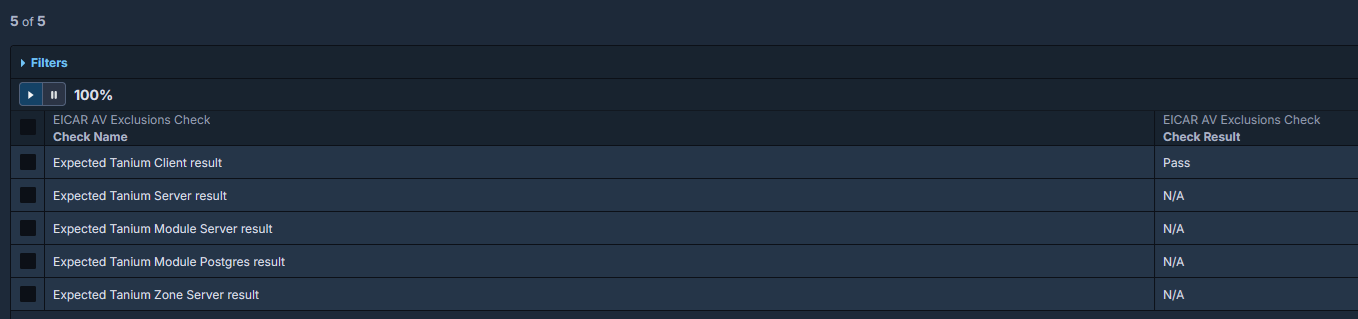
A healthy result shows that the EICAR file remains present and the sensor returns a passing outcome.
Interpreting Results
- Pass: The EICAR file is still present, suggesting exclusions are working.
- Fail / Missing: The file was quarantined or removed, suggesting AV/EPP is interfering with Tanium content.
Remediation
- Review AV/EPP exclusions for the Tanium Client directory and related working paths.
- Check quarantine, behavioral protection, and EDR events for evidence of blocked Tanium artifacts.
- Coordinate with the security team to validate approved exclusions.
- Re-run the EICAR test after exclusions are updated.
Incorporate this check into new environment onboarding and after major security policy changes to validate that Tanium operations will not be disrupted by endpoint protection controls.
Was this article helpful?
That’s Great!
Thank you for your feedback
Sorry! We couldn't be helpful
Thank you for your feedback
Feedback sent
We appreciate your effort and will try to fix the article